Spring cloud stream 5 ref 요약번역
Spring Cloud Stream 5
https://docs.spring.io/spring-cloud-stream/reference/index.html
원문을 읽고 공부하고 요약하여 내 지식으로 만들기
A Brief History of Spring’s Data Integration Journey
클라우드 마이크로서비스가 엔터프라이즈에 중요해짐에 따라 스프링 데이터 통합과 스프링부트가 합쳤고 스프링 클라우드 스트림이 생겨나게 되었다. 스프링 클라우드 스트림은 개발자에게 데이터 중심의 마이크로서비스 아키텍쳐에서 서비스를 개발하는데에 여러 편의를 제공한다.
5분 레시피
스프링 클라우드 스트림의 컨셉을 이해하기 위한 메세지 수신로깅 학습 테스트가 있다. 스프링 이니셜라이저로 Cloud Stream과 원하는 RabbitMQ 의존성을 추가해 프로젝트를 빌드한다. 아래와 같이 빈을 작성하면 자동으로 수신핸들러로 등록된다.
1
2
3
4
5
6

@Bean
public Consumer<Person> log() {
  //Person은 name 필드를 가지는 DTO
  return person -> System.out.println("Received: " + person);
}
이제 RabbitMQ가 실행된 상태에서 스프링부트를 실행하고 메세지를 보내면 콘솔로그가 프린트된다.
Spring Expression Language 사용 주의
스프링 클라우드 스트림에서 메세지는 Message<byte[]> 타입으로 수신된다. raw 타입이니 여기에 SpEL로 페이로드를 조회하여 라우팅하거나 하지말자. 메세지 헤더에 읽기 좋은 문자열 정보를 넣고 이것을 SpEL로 읽는 것이 더 안전하고 업계표준이다.
Main Concepts and Abstractions
The Binder Abstraction
스프링 클라우드 스트림은 커스텀 구현이 가능한 바인더 추상을 정의하고 카프카와 레빗MQ에 대해 테스트를 포함하는 바인딩 구현체를 제공한다. 관련 설정이 스프링부트 방식으로 동적 적용이 가능하며 스프링부트가 바인더를 클래스 패스에서 찾기 때문에 복수의 미들웨어에 대한 통합도 가능하다.
1
2
3
# 예시) 입력 바인딩 네임: uppercase-in-0
# 예시) 출력 바인딩 네임: uppercase-out-0
spring.cloud.stream.bindings.<bindingName>
Consumer Groups
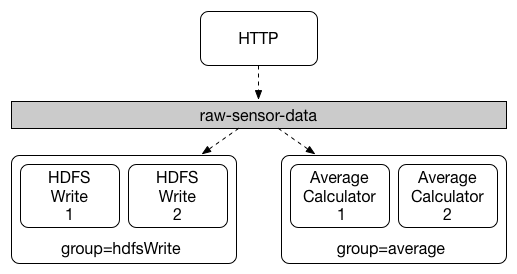
스케일업이 필요한 환경에서 특정 메세지를 처리하고자하는 컨슈머가 늘어나게 되면 일종의 경쟁구조를 가지게된다. 이에 스프링 클라우드 스트림은 한 컨슈머 그룹안에서는 한 멤버 컨슈머만 메세지를 전달받도록 하여 이 문제를 해결한다. 프로퍼티 설정은 spring.cloud.stream.bindings.<bindingName>.group={groupName}로 지정한다. 지정되지 않은 바인더는 독립 그룹으로 자동 지정된다.
Partitioning
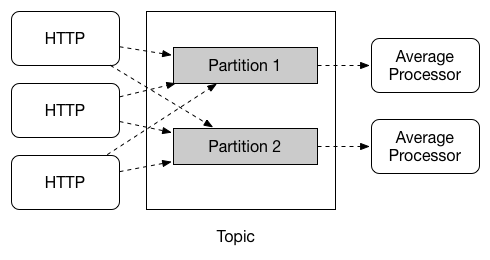
스프링 클라우드 스트림은 데이터의 특징에 따라 동일 컨슈머가 처리하도록 할 수 있는 파티셔닝과 추상화를 제공한다. 특별히 타임원도우 계산과 같은 유즈케이스에서는 파티셔닝이 중요하고 데이터의 I/O를 모두 그것에 맞도록 설정해야한다.
Configuring Output Bindings for Partitioning
아웃바인더의 파티셔닝 설정은 partitionKeyExpression 와 partitionKeyExtractorName 중 하나를 이용하고 partitionCount를 지정하면 됩니다.
1
2
3
4
5
# SpEL 을 사용하는 경우
spring.cloud.stream.bindings.func-out-0.producer.partitionKeyExpression=headers.id
  # org.springframework.cloud.stream.binder.PartitionKeyExtractorStrategy 구현체 bean을 사용하는 경우
  # spring.cloud.stream.bindings.func-out-0.producer.partitionKeyExtractorName=customPartitionKeyExtractor
spring.cloud.stream.bindings.func-out-0.producer.partitionCount=5 # 파티션 갯수
아웃바운드 데이터의 파티션은 인덱스가 0부터 시작하며 선택 기본 로직은 key.hashCode() % partitionCount 입니다. 이것 또한 필요하다면 커스텀 가능합니다.
1
2
# PartitionKeyExtractorStrategy 을 구현한 커스텀 파티션 선택기 bean을 지정
spring.cloud.stream.bindings.func-out-0.producer.partitionSelectorName=customPartitionSelector
Configuring Input Bindings for Partitioning
1
2
3
4
5
6
spring.cloud.stream.bindings.uppercase-in-0.consumer.partitioned=true # 파티셔닝 설정 ON

  # Native partitioned binding을 지원하지 않는 RabbitMQ 경우 필수임
  # 카프카의 경우 `autoRebalanceEnabled(default true)`로 자동 배분하지만 정밀한 제어가 필요한 경우 옵션을 끄고 지정이 가능함.
spring.cloud.stream.instanceIndex=3 # 현재 인스턴스 인덱스 (0부터 시작), 파티션과 무관
spring.cloud.stream.instanceCount=5 # 처리 가능한 인스턴스 갯수
programing model
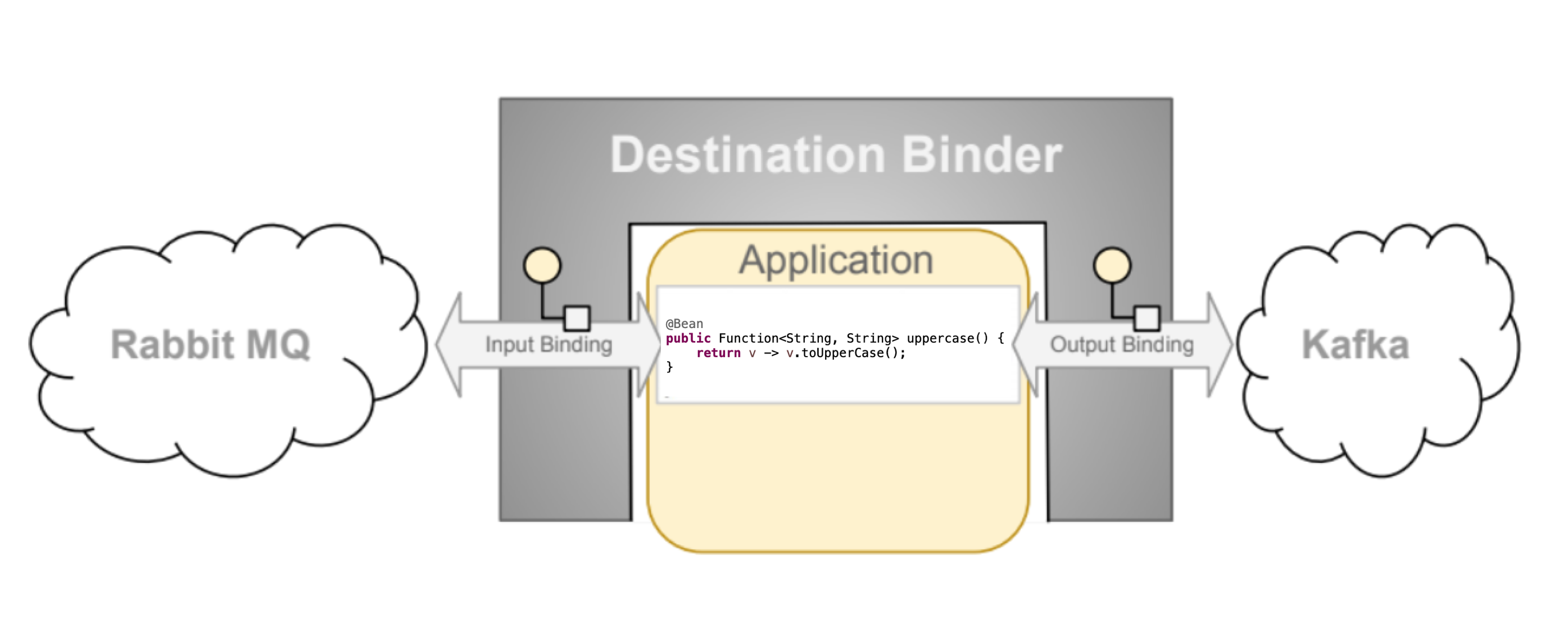
Destination Binders는 외부 미들웨어와의 통합에 있어 기반 시스템을 제공한다.
Functional binding names
Bindings는 함수형인터페이스로 정의한 @Bean 인스턴스로 프로듀서/컨슈머이며 메세지 전달받은 페이로드에 대한 커스텀 파이프라인을 정의한다. 앱 프로퍼티에 spring.cloud.stream.bindings.<bindingName>에 들어가는 binding names에는 관례적인 규칙이 있는데 이런 식이다.
함수이름 + -in또는out- + 함수객체의 인덱스번호
그래서 spring.cloud.stream.bindings.uppercase-in-0.destination=my-topic와 같이 적을 수 있고 destination은 목적지(수신자, 발신자) 카프카에서는 topic이라고 보면된다.
특정 바인딩 네임에 대해 별칭을 줄수도 있다. spring.cloud.stream.function.bindings.uppercase-in-0=input으로 지정하면 spring.cloud.stream.bindings.input.destination=my-topic으로 참조할 수 있게 된다. 다만 explicit binding name 방식과 혼동될 수 있으므로 추천하지는 않는다.
두개 이상의 함수 빈 인스턴스를 먼저 spring.cloud.function.definition에 ; 구분자로 지정하면 자동으로 바인딩 규칙에 따른 in-0 , out-0 바인딩이 된다.
Explicit binding creation
함수형 바인딩은 보통 메세지 수신이 트리거가 되는데 메세지 스트림을 직접 조작해야할 일이 생긴다. 예를 들어 HTTP 요청을 받아서 이를 메세지 스트림에 발행해야하는 경우가 있겠다. 스프링 클라우드 스트림은 명시적 바인더이름을 선언하면 StreamBridge으로 조작가능한 바인더를 자동으로 만들어준다.
1
2
3
spring.cloud.stream:
  input-bindings=fooin;barin  # ; 로 여러개 선언가능
  output-bindings=fooout;barout
Binding visualization and control
스프링 클라우드 스트림은 Actuator 엔드 포인트나 프로그래밍방식을 통해 바인딩을 시각화하고 조작할 수 있도록 해준다.
Programmatic way
3.1 버전부터 org.springframework.cloud.stream.binding.BindingsLifecycleController가 자동으로 등록된다. 아래처럼 활용가능하고 바인딩을 새로 만들거나 상세 프로퍼티도 조작할 수 있다.
1
2
3
4
5
6
7
8
9
10
11
12
13
14
15
16
//BindingsLifecycleController을 찾고 바인딩을 확인하기
BindingsLifecycleController bindingsController = context.getBean(BindingsLifecycleController.class);
Binding binding = bindingsController.queryState("echo-in-0");

assertThat(binding.isRunning()).

isTrue();
bindingsController.

changeState("echo-in-0",State.STOPPED);

//Alternative way of changing state. For convenience we expose start/stop and pause/resume operations.
//bindingsController.stop("echo-in-0")
assertThat(binding.isRunning()).

isFalse();
Actuator
의존성을 로드하고 management.endpoints.web.exposure.include=bindings을 추가하면 기동시 API가 등록된다는 로그를 볼 수 있다. <host>:<port>/actuator/bindings에서 볼 수 있다. 조작 기능은 미들웨어에 따라 지원여부가 다르니 확인후 사용한다.
Sanitize Sensitive Data
엑츄에이터를 사용하면 민감정보가 노출될 수 있다. SanitizingFunction으로 해결한다.
1
2
3
4
5
6
7
8
9
10
11

@Bean
public SanitizingFunction sanitizingFunction() {
  return sanitizableData -> {
    if (sanitizableData.getKey().equals("sasl.jaas.config")) {
      return sanitizableData.withValue("data-scrambled!!");
    } else {
      return sanitizableData;
    }
  };
}
Producing and Consuming Messages
스프링 클라우드 스트림은 Function and Consumer와 같은 함수형 구현을 추천한다. 함수형 싱글 빈들은 기본적으로 spring.cloud.stream.function.autodetect=true자동 감지되어 함수이름을 조합하여 toUpperCase-in-0와 같은 자동생성이름으로 바인더에 등록되긴 하지만 혼란을 줄이기 위해서 명시적으로 spring.cloud.function.definition프로퍼티로 함수이름을 지정하는 것도 권장된다.
Suppliers (Sources)
Function and Consumer와 다르게 Supplier는 in 으로 바인딩이 되는 것이 아니다. 대신 프레임워크의 default polling mechanism에 따라 1초 마다 invoked 된다. 이러한 풀링은 커스텀도 가능하다.
그리고 Flux<String>을 반환하는 서플라이어 타입인 경우 처음 1회만 호출된다. 무한 스트림인경우에는 호출 후 그것이 유지될 것이고 유한 스트림인 경우에는 폴링이 필요한 경우가 있어서 @PollableBean을 사용하여 폴링이 이뤄지도록 지원한다. 이경우 애노테이션에 기본으로 splittable=true으로 유한 스트림을 모아서 하나의 메세지로 보낼지 여부를 선택 가능한다.
서플라이어 빈은 태생상 요청 스레드에 의해 제어되지 않으므로 스레드 문제가 발생할 여지가 있다. 이를 명시적으로 관리하기 위해서는 서플라이어 빈을 지정하는 대신 StreamBridge로 같은 기능을 직접 관리하는 것이 권장된다.
Consumer (Reactive)
리액티브 컨슈머는 반환타입이 void이기 때문에 함수바디가 구독 .subscribe()을 하지 않아도 작성이 가능해서 잘못하면 혼란이 발생할 수 있다. 대신 명시적으로 flux -> flux.map(..).filter(..).then() 처럼 Function<Flux<?>, Mono<Void>> 로 작성하는게 권장된다.
Polling Configuration Properties
spring.integration.poller.로 시작하는 프로퍼티로 기본 폴러의 인터벌,cron 설정이 가능하다. 개별 바인더에 대한 폴러는 spring.cloud.stream.bindings.supply-out-0.producer.poller.로 시작하는 설정을 추가함으로서 가능하다.
Sending arbitrary data to an output (e.g. Foreign event-driven sources)
만약 REST API로 전달받은 데이터를 이벤트 스트림에 푸시해야하는 경우. 웹 스코프에서 streamBridge.send(바인딩이름, obj)과 같이 사용할 수 있다. 바인딩 이름은 있고 함수가 없어도 프레임워크가 동적으로 이를 대신하여 푸시한다. 바인딩 이름을 사전에 지정하지 않는 경우에도 바인딩 이름을 토픽으로 간주하고 푸시를 진행하긴하는데 권장되진 않는다. 인자로 전달되는 메세지 타입은 오브젝트이고 POJO or Message타입으로 보낼 수 있다.
streamBridge는 기본적으로 호출하는 스레드를 사용하지만 비동기로 보내야하는 경우 관련 옵션을 사용할 수 있다. 비동기 전송의 관측가능성을 위해 micrometer의 context-propagation을 사용할 수도 있다.
스프링클라우드 스트림은 StreamBridge.send() 로 전달하는 바인딩 이름이 없는 경우 자동으로 그것을 바인더로 생성하고 동일한 이름의 destination(topic)으로 매핑한다. 다만 캐시 용량이 기본적으로 제한되어있고 크기를 제어할 수 있으나 메모리 리크 우려가 있어 권장되지 않는다.
public boolean send(String bindingName, Object data, MimeType outputContentType) 메서드를 사용하여 컨텐츠 타입 지정이 가능하다.
기본적으로 spring.cloud.stream.output-bindings 와 같이 바인더를 지정한것과는 별개로 StreamBridge에서 동적 바인더 생성시에는 명시적으로 바인더 타입을 지정해줄 수도 있다. public boolean send(String bindingName, @Nullable String binderType, Object data) 와같은 메서드를 사용하면 된다. 단 바인더 이름은 프로퍼티를 우선한다.
StreamBridge은 아웃 바인딩을 만들때 (글로벌/커스텀)채널 인터셉터를 지정해줄 수도 있다.
Reactive Functions support
기본적으로 스프링 클라우드 스트림은 리액티브를 지원하긴한다. 다만 imperative와는 패러다임이 다르므로 프레임워크에 덜 의지하는 방식의 코드 작성이 필요하다
스트림 복수를 하나의 핸들러에서 처리하거나 하나의 핸들러에서 여러 핸들러로 메세지를 수신하는 방법이 있다. 리액터와 튜플자료형을 사용하는데 이 요약본에서는 정리하지 않기로 했다.
Functional Composition
함수형 메세지 핸들러를 조합한 방식의 바인딩도 제공한다. spring.cloud.function.definition=toUpperCase|wrapInQuotes 처럼 파이프라인으로 두개의 함수형 핸들러를 묶을 수 있고 저 선언 자체를 바인딩 이름처럼 쓸 수 있다. 이러한 방식은 횡단 관심사를 처리하기 위한 어드바이스를 마치 함수형 핸들러로 적용하는 것처럼 쓸 수도 있다.
Batch Consumers
pring.cloud.stream.bindings.<binding-name>.consumer.batch-mode를 true로 하면 Function<List<Person>, Person>와 같이 배치 컨슈머를 사용할 수 있다.
The headers of batched messages are created by binders like amqp_batchedHeaders or kafka_batchConvertedHeaders, respectively.
If a message represents batched many messages, it’ll have MessageHeaders contains a set of all message headers.
The fail-control of message conversion is depending on the function’s signature and an implementation of MessageConverterHelper interface.
When its payload fails for conversion, the framework tries to invoke your function with the raw message. If the function is expected POJO as arguments, it’ll be thrown an exception. In a batch process, a failed payload is removed and effectively reduces the batch size without any exception.
And the default implementations of MessageConverterHelper for Kafka and Rabbit automatically remove the header of the failed to conversion message from its header set.
Batch Producers
You can produce many messages at once by using Function<String, List<Message<String>>> signature.
Spring Integration flow as functions
It supports Spring Integration (SI) like this.
1
2
3
4
5
6
7
8
9
10

@Bean
public IntegrationFlow uppercaseFlow() {
  return IntegrationFlow.from(MessageFunction.class, spec -> spec.beanName("uppercase"))
    .<String, String>transform(String::toUpperCase)
    .log(LoggingHandler.Level.WARN)
    .bridge()
    .get();
}
Using Polled Consumers
If you need an individual input binding for a destination, the Polled Consumer is useful. You can bind it like spring.cloud.stream.pollable-source=myDestination and you and wire it as @Qualifier("myDestination-in-0") PollableMessageSource destIn ,then use method boolean poll(Message<?> message))`
By default, if an error occurs in the message handler, the message is rejected without re-queueing. In Kafka, this results in committing the offset to move forward to the next message
You also can override the behavior of acknowledgment in PollableMessageSource’s poll() method for Error handling.
Handling Errors
By default, an error channel is configured for the pollable source; if the callback throws an exception, an ErrorMessage is sent to the error channel <destination>.<group>.errors this error channel is also bridged to the global Spring Integration errorChannel. But it is not automatically created external bindings.
You can subscribe either with @ServiceActivator. If neither channel is subscribed, the error will be simply logged and acknowledged as successful. If the activator service throws `RequeueCurrentMessageException, the message will be re-queued. When the other exceptions are thrown, it’ll be rejected by default.
Since Error handling is important, I recommend following the best practice or convention of your industry.
Event Routing
routing TO …
write spring.cloud.stream.function.routing.enabled=true or providing spring.cloud.function.routing-expression enables to rely on RoutingFunction for route events. The binding name of default routing function is functionRouter-in-0.
Here is an example using a dynamic route with SpEL.
1
2
3
4
5
6
7
8
9
10
11
12
13
14
@SpringBootApplication
public class RoutingStreamApplication {

  public static void main(String[] args) {
      SpringApplication.run(RoutingStreamApplication.class,
	  "--spring.cloud.function.routing-expression="
	  + "T(java.lang.System).nanoTime() % 2 == 0 ? 'even' : 'odd'");
  }
  @Bean
  public Consumer<Integer> even() { return value -> System.out.println("EVEN: " + value); }

  @Bean
  public Consumer<Integer> odd() {return value -> System.out.println("ODD: " + value);}
}
RoutingFunction works unlike Function. If you let it route to Consumer, it works like Consumer (No output). If you let it route Function, it’ll be got output.
routing FROM …
Spring Cloud Stream lets it can send a message to dynamical bound destinations.
First way: Let Function returnType Message<T> and setHeader “spring.cloud.stream.sendto.destination” your destination name. When you want congifure this work, you can register NewDestinationBindingCallback<>bean like this.
1
2
3
4
5
6
7
8
9
@Bean
public NewDestinationBindingCallback<RabbitProducerProperties> dynamicConfigurer() {
    return (name, channel, props, extended) -> {
        props.setRequiredGroups("bindThisQueue");
        extended.setQueueNameGroupOnly(true);
        extended.setAutoBindDlq(true);
        extended.setDeadLetterQueueName("myDLQ");
    };
}
Post-processing (after sending message)
PostProcessingFunction is useful for adding some tasks after completion of sending a message. You can add a new side effect by implementing its postProcess(Message>) method. Or you can concatenate a new PostProcessingFunction after the target function like function definition foo|yourPostFuntion.
note: If the last function is not an instance of PostProcessingFunction, then no post-processing functionality will be performed.
Binder abstraction
Spring Cloud Stream provides a Binder abstraction for use in connecting to physical destinations at the external middleware
Producers and Consumers
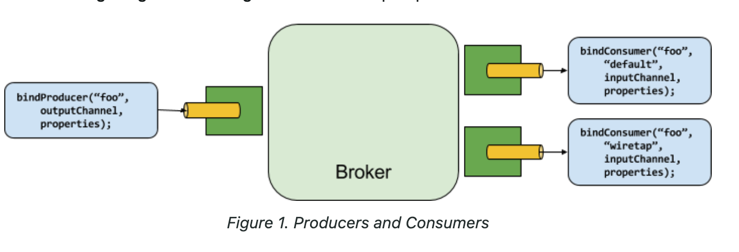
Binder SPI(Service Provider Interface)
The Binder SPI provides a pluggable mechanism for connecting to external middleware. The key point of the SPI is the Binder interface, which is a strategy for connecting to external middleware.
1
2
3
4
5
public interface Binder<T, C extends ConsumerProperties, P extends ProducerProperties> {
    Binding<T> bindConsumer(String bindingName, String group, T inboundBindTarget, C consumerProperties);

    Binding<T> bindProducer(String bindingName, T outboundBindTarget, P producerProperties);
}
Binder Detection
By default, Spring Cloud Stream relies on Spring Boot’s auto-configuration to configure the binding process. If a single Binder implementation is found on the classpath, Spring Cloud Stream automatically uses it.
Multiple Binders on the Classpath, Connecting to Multiple Systems
I will skip it. When I need this knowledge, I’ll search.
Error Handling
Note, the techniques are dependent on binder implementation and the capability of the underlying messaging middleware as well as programming model
By default, it will retry by three times. If all fail finally, it is up to the error handling mechanism. It may drop, re-queue or send to DLQ.
Since the Reactive API provides its own mechanism to handle errors, this section focuses on the Message handlers (i.e., imperative functions).
Drop Failed Messages
By default, if no additional Error handlings, it will drop the Message occurred an error after logging.
Handle Error Messages
Note: Custom error handler is mutually exclusive with the framework’s configuration. If you add a new Custom error handler, configured handlers like DLQ settings won’t work as before.
You can do so by adding Consumer designed to accept ErrorMessage which contains the original message and error information. And you need to prvide property spring.cloud.stream.bindings.<binding-name>.error-handler-definition=myErrorHandler.
If you want to have a single error handler for all function beans, you can use properties spring.cloud.stream.default.error-handler-definition=myErrorHandler
DLQ - Dead Letter Queue
You can configure like this :
1
2
3
4
5
6
7
8
9
10
11
12
13
14
15
spring:
  cloud:
    # 1. 공통 바인딩 설정
    stream:
      bindings:
        uppercase-in-0: # 사용하는 함수명 또는 바인딩 이름
          destination: input-topic
          group: my-consumer-group

      # 2. 카프카 바인더 전용 확장 설정
      kafka.bindings:
          uppercase-in-0:
            consumer:
              # DLQ 활성화 (기본값은 false)
              enable-dlq: true #destination은 function.그룹.dlq로 자동지정됨
Retry Template
The RetryTemplate is part of the Spring Retry library. I’ll introduce its default properties shortly.
- maxAttempts: The number of attempts to process the message. Default: 3.
- backOffInitialInterval:The backoff initial interval on retry. Default 1000 milliseconds.
- backOffMaxInterval: The maximum backoff interval. Default 10000 milliseconds.
- backOffMultiplier: The backoff multiplier. Default 2.0.
- defaultRetryable: Whether exceptions thrown by the listener that are not listed in the retryableExceptions are retryable. Default: true.
- retryableExceptions: A map of Throwable class names in the key and a boolean in the value. Specify those exceptions (and subclasses) that will or won’t be retried. Also see defaultRetriable. Example: spring.cloud.stream.bindings.input.consumer.retryable-exceptions.java.lang.IllegalStateException=false. Default: empty.
You can override it with registering an annotated @StreamRetryTemplate instance or defining spring.cloud.stream.bindings.<foo>.consumer.retry-template-name=<your-retry-template-bean-name>
Observability
Spring provides support for Observability via Micrometer.
1
2
3
4
5
6
7
8
<dependency>
	<groupId>org.springframework.boot</groupId>
	<artifactId>spring-boot-starter-actuator</artifactId>
</dependency>
<dependency>
	<groupId>io.projectreactor</groupId>
	<artifactId>reactor-core-micrometer</artifactId>
</dependency>
Imperative Functions
mperative functions are wrapped with the observation wrapper ObservationFunctionAroundWrapperwhich interact each invocation.
Reactive Functions
I’ll skip it.
Configuration Options
Binding Service Properties
These properties are exposed via org.springframework.cloud.stream.config.BindingServiceProperties
spring.cloud.stream.instanceCount: The number of deployed instances. Must be set for partitioning on the producer side. Must be set on the consumer side if autoRebalanceEnabled=false. Default: 1.
spring.cloud.stream.instanceIndex: The instance index of the application: A number from 0. Used for partitioning if autoRebalanceEnabled=false.
spring.cloud.stream.dynamicDestinations: A list of destinations that can be bound dynamically. If set, only listed destinations can be bound. Default: empty (letting any destination be bound).
spring.cloud.stream.defaultBinder: The default binder to use, if multiple binders are configured. See Multiple Binders on the Classpath. Default: empty.
spring.cloud.stream.overrideCloudConnectors: This property is only applicable when the cloud profile is active and Spring Cloud Connectors are provided with the application. When set to true, this property instructs binders to completely ignore the bound services and rely on Spring Boot properties. The typical usage of this property is to be nested in a customized environment when connecting to multiple systems. Default: false.
spring.cloud.stream.bindingRetryInterval: The interval (in seconds) between retrying binding creation when, for example, the binder does not support late binding and the broker is down. Set it to zero to treat such conditions as fatal, preventing the application from starting. Default: 30
Binding Properties
Binding properties are supplied by using the format of spring.cloud.stream.bindings.<bindingName>.<property>=<value>. The <bindingName> represents the name of the binding being configured.
Common Binding Properties
The following binding properties are available for both input and output bindings and must be prefixed with spring.cloud.stream.bindings.<bindingName>.
Default values can be set by using the spring.cloud.stream.default prefix
destination: The target destination of a binding on the bound middleware. If binding represents a consumer binding (input), it could be bound to multiple destinations, and the destination names can be specified as comma-separated String values. If not, the actual binding name is used instead. The default value of this property cannot be overridden.
group: The consumer group of the binding. Applies only to inbound bindings. Default: null (indicating an anonymous consumer).
contentType: The content type of this binding. See Content Type Negotiation. Default: application/json.
binder: The binder used by this binding. See Multiple Binders on the Classpath for details. Default: null (the default binder is used, if it exists).
Consumer Properties
The following binding properties are available for input bindings only and must be prefixed with spring.cloud.stream.bindings.
Default values can be set by using the spring.cloud.stream.default.consumer prefix (for example, spring.cloud.stream.default.consumer.headerMode=none).
autoStartup: Signals if this consumer needs to be started automatically Default: true.
concurrency: The concurrency of the inbound consumer. Default: 1.
partitioned: Whether the consumer receives data from a partitioned producer. Default: false.
headerMode: When set to none, disables header parsing on input. Effective only for messaging middleware that does not support message headers natively. When set to headers, it uses the middleware’s native header mechanism. When set to embeddedHeaders, it embeds headers into the message payload. Default: depends on the binder implementation.
maxAttempts: If processing fails, the number of attempts to process the message (including the first). Set to 1 to disable retry. Default: 3.
backOffInitialInterval: The backoff initial interval on retry. Default: 1000.
backOffMaxInterval: The maximum backoff interval. Default: 10000.
backOffMultiplier: The backoff multiplier. Default: 2.0.
defaultRetryable: Whether exceptions thrown by the listener that are not listed in the retryableExceptions are retryable. Default: true.
instanceCount: When set to a value greater than equal to zero, it allows customizing the instance count of this consumer. Default: -1.
instanceIndex: When set to a value greater than equal to zero, it allows customizing the instance index of this consumer. Default: -1.
instanceIndexList: Used with binders that do not support native partitioning (such as RabbitMQ); allows an application instance to consume from more than one partition. Default: empty.
retryableExceptions: A map of Throwable class names in the key and a boolean in the value. Specify those exceptions (and subclasses) that will or won’t be retried. Also see defaultRetryable. Example: spring.cloud.stream.bindings.input.consumer.retryable-exceptions.java.lang.IllegalStateException=false. Default: empty.
useNativeDecoding: When set to true, the inbound message is deserialized directly by the client library, which must be configured correspondingly (for example, setting an appropriate Kafka producer value deserializer). Default: false.
multiplex: When set to true, the underlying binder will natively multiplex destinations on the same input binding. Default: false.
Advanced Consumer Configuration
For advanced configuration of the underlying message listener container for message-driven consumers, add a single ListenerContainerCustomizer bean to the application context.
Producer Properties
The following binding properties are available for output bindings only and must be prefixed with spring.cloud.stream.bindings.
Default values can be set by using the prefix spring.cloud.stream.default.producer (for example, spring.cloud.stream.default.producer.partitionKeyExpression=headers.id).
autoStartup: Signals if this consumer needs to be started automatically Default: true.
partitionKeyExpression: A SpEL expression that determines how to partition outbound data. If set, outbound data on this binding is partitioned. partitionCount must be set to a value greater than 1 to be effective. See Partitioning. Default: null.
partitionKeyExtractorName: The name of the bean that implements PartitionKeyExtractorStrategy. Used to extract a key used to compute the partition id (see ‘partitionSelector*’). Mutually exclusive with ‘partitionKeyExpression’. Default: null.
partitionSelectorName: The name of the bean that implements PartitionSelectorStrategy. Used to determine partition id based on partition key (see ‘partitionKeyExtractor*’). Mutually exclusive with ‘partitionSelectorExpression’. Default: null.
partitionSelectorExpression: A SpEL expression for customizing partition selection. If neither is set, the partition is selected as the hashCode(key) % partitionCount, where key is computed through either partitionKeyExpression. Default: null.
partitionCount: The number of target partitions for the data, if partitioning is enabled. Must be set to a value greater than 1 if the producer is partitioned. On Kafka, it is interpreted as a hint. The larger of this and the partition count of the target topic is used instead. Default: 1.
requiredGroups: A comma-separated list of groups to which the producer must ensure message delivery even if they start after it has been created (for example, by pre-creating durable queues in RabbitMQ).
headerMode: When set to none, it disables header embedding on output. It is effective only for messaging middleware that does not support message headers natively and requires header embedding. Default: Depends on the binder implementation.
useNativeEncoding: When set to true, the outbound message is serialized directly by the client library, which must be configured correspondingly (for example, setting an appropriate Kafka producer value serializer). Default: false.
errorChannelEnabled: When set to true, if the binder supports asynchronous send results, send failures are sent to an error channel for the destination. See Error Handling for more information. Default: false.
Advanced Producer Configuration
In some cases, you may prefer a programmatic approach while configuring such producing MessageHandler. spring-cloud-stream provides ProducerMessageHandlerCustomizer to accomplish it.
Content Type Negotiation
In Spring Cloud Stream, message transformation is accomplished with an org.springframework.messaging.converter.MessageConverter.
Mechanics
Spring Cloud Stream provides three mechanisms to define contentType: in order of precedence
- HEADER: The contentType can be communicated through the Message itself. By providing a contentType header.
- BINDING: The contentType can be set per destination binding by setting the spring.cloud.stream.bindings.input.content-type property.
- DEFAULT: application/json.
when the return value is not a Message, the new Message is constructed with the return value as the payload while inheriting headers from the input Message minus the headers defined or filtered by SpringIntegrationProperties.messageHandlerNotPropagatedHeaders.then also contentType. In this case, contentType will be evaluated when about to send by framework.
Message Converter
MessageConverter defines 2 methods.
1
2
3
Object fromMessage(Message<?> message, Class<?> targetClass);

Message<?> toMessage(Object payload, @Nullable MessageHeaders headers);
Provided MessageConverters
JsonMessageConverter: (DEFAULT).
ByteArrayMessageConverter
ObjectStringMessageConverter: Supports conversion of any type to a String when contentType is text/plain. It invokes Object’s toString() method or, if the payload is byte[], a new String(byte[]).
When no appropiate conveter is found, the framework throws an exception.
User-defined Message Converters
Implement org.springframework.messaging.converter.MessageConverter, configure it as a @Bean. It is then appended to the existing stack of MessageConverters.
Custom MessageConverter implementations take precedence over the existing ones, which lets you override as well as add to the existing converters.
Inter-Application Communication
Connecting Multiple Application Instances
Partitioning
Configuring Output Bindings for Partitioning
You can configure an output binding to send partitioned data by setting one and only one of its partitionKeyExpression(SpEL) or partitionKeyExtractorName(implementation of org.springframework.cloud.stream.binder.PartitionKeyExtractorStrategy) properties, as well as its partitionCount property.
Testing
https://docs.spring.io/spring-cloud-stream/reference/spring-cloud-stream/spring_integration_test_binder.html
Spring Integration Test Binder
Spring Cloud Stream comes with a test binder which you can use for testing the various application components without requiring an actual real-world binder implementation or a message broker.
To enable Test binder, add dependency and use @EnableTestBinder
1
2
3
4
5
<dependency>
    <groupId>org.springframework.cloud</groupId>
	<artifactId>spring-cloud-stream-test-binder</artifactId>
	<scope>test</scope>
</dependency>
Test Binder and PollableMessageSource
If @EnableTestBinder is set, PollableMessageSource#poll return a message contain payload “POLLED DATA” as default. You can orride this action by register MessageSource bean. When you want multi-sourced, plz find configuration about input destination.
Health Indicator
Spring Cloud Stream provides a health indicator for binders. It is registered under the name binders and can be enabled or disabled by setting the management.health.binders.enabled property.
To enable health check you first need to enable both “web” and “actuator” by including its dependencies
You can access the health indicator /actuator/health. In order to browse the full details, you need to include the property management.endpoint.health.show-details with the value ALWAYS.
If you use Multiple binder implementations in your app, you need more consideration for health checks of binders. https://docs.spring.io/spring-cloud-stream/reference/spring-cloud-stream/health-indicator.html
sample
https://github.com/spring-cloud/spring-cloud-stream-samples
Spring Cloud Stream Schema Registry
overview
A schema registry lets you store schema information in a textual format (typically JSON) and makes that information accessible to various applications that need it to receive and send data in binary format. A schema is referenceable as a tuple consisting of:
- A subject that is the logical name of the schema
- The schema version
- The schema format, which describes the binary format of the data
Spring Cloud Stream Schema Registry provides the following components
- Standalone Schema Registry Server : By default, it is using H2, but configuration is able.
- Schema registry client : the client can communicate to the standalone schema registry or the Confluent Schema Registry.
Schema Registry Client
The client-side abstraction for interacting with schema registry servers is the SchemaRegistryClient interface.
It can be configured by using @EnableSchemaRegistryClient The default client does not chache response. you can configure it.
Schema Registry Client Properties
The Schema Registry Client supports the following properties:
spring.cloud.stream.schemaRegistryClient.endpoint: use a full URL, including protocol (http or https) , port, and context path. Default: localhost:8990/
spring.cloud.stream.schemaRegistryClient.cached: Default:false
Avro Schema Registry Client Message Converters
Spring Cloud Stream auto-configures an Apache Avro message converter for schema management.
For outbound messages, if the content type of the binding is set to application/*+avro, the MessageConverter is activated.
The message converter tries to infer the schema of each outbound messages (based on its type) and register it to a subject (based on the payload type) by using the SchemaRegistryClient. The message is sent with a contentType header by using the following scheme: application/[prefix].[subject].v[version]+avro.
Avro Schema Registry Message Converter Properties
If you have enabled Avro based schema registry client by setting spring.cloud.stream.stream.bindings.<output-binding-name>.contentType=application/*+avro, you can customize the behavior of the registration by setting the following properties.
spring.cloud.stream.schema.avro.dynamicSchemaGenerationEnabled : Enable if you want the converter to use reflection to infer a Schema from a POJO. Default: false
- spring.cloud.stream.schema.avro.readerSchema : If set, this overrides any lookups at the schema server and uses the local schema as the reader schema. Default: null
spring.cloud.stream.schema.avro.schemaLocations : Registers any .avsc files listed in this property with the Schema Server. Default: empty
spring.cloud.stream.schema.avro.prefix : The prefix to be used on the Content-Type header. Default: vnd
spring.cloud.stream.schema.avro.subjectNamingStrategy: Determines the subject name used to register the Avro schema in the schema registry. Default: org.springframework.cloud.stream.schema.avro.DefaultSubjectNamingStrategy
- spring.cloud.stream.schema.avro.ignoreSchemaRegistryServer : Ignore any schema registry communication. Useful for testing purposes so that when running a unit test, it does not unnecessarily try to connect to a Schema Registry server. Default: false
Coverters with Schema Support
If you provide a custom converter, then the default AvroSchemaMessageConverter bean is not created.
Schema Registry Server
Spring Cloud Stream provides a schema registry server implementation. To use it, you can download latest spring-cloud-stream-schema-registry-server release.
Schema Registry Server API
The Schema Registry Server API consists of the following operations:
- POST / — see Registering a New Schema
- GET /{subject}/{format}/{version} — see Retrieving an Existing Schema by Subject, Format, and Version
- GET /{subject}/{format} — see Retrieving an Existing Schema by Subject and Format
- GET /schemas/{id} — see Retrieving an Existing Schema by ID
- DELETE /{subject}/{format}/{version} — see Deleting a Schema by Subject, Format, and Version
- DELETE /schemas/{id} — see Deleting a Schema by ID
- DELETE /{subject} — see Deleting a Schema by Subject
Registering a New Schema
To register a new schema, send a POST request to the / endpoint.
The / accepts a JSON payload with the following fields:
subject: The schema subject format: The schema format definition: The schema definition
Its response is a schema object in JSON, with the following fields:
id: The schema ID subject: The schema subject format: The schema format version: The schema version definition: The schema definition
Schema Registry Server API others
see https://docs.spring.io/spring-cloud-stream/reference/schema-registry/spring-cloud-stream-schema-registry.html
Apache Kafka.Kafka Binder
Usage
o use Apache Kafka binder, you need to add spring-cloud-stream-binder-kafka as a dependency to your Spring Cloud Stream application, as shown in the following example for Maven:
1
2
3
4
<dependency>
  <groupId>org.springframework.cloud</groupId>
  <artifactId>spring-cloud-stream-binder-kafka</artifactId>
</dependency>
Alternatively, you can also use the Spring Cloud Stream Kafka Starter, as shown in the following example for Maven:
1
2
3
4
<dependency>
  <groupId>org.springframework.cloud</groupId>
  <artifactId>spring-cloud-starter-stream-kafka</artifactId>
</dependency>